
Keeping up with everyday responsibilities can feel like a never-ending cycle of remembering, checking, and following up.
I don't mind keeping track of plans, staying on top of , and doing boring admin work. However, having to remember to do them over and over again is exhausting.
That's why Gemini's Scheduled actions feature caught my attention. Instead of opening the app and asking the same questions every day or week, I can schedule a prompt to run regularly and have the results waiting for me.
Here are the ways I use them to make my everyday routine a little less stressful.
How to set up scheduled actions in Gemini
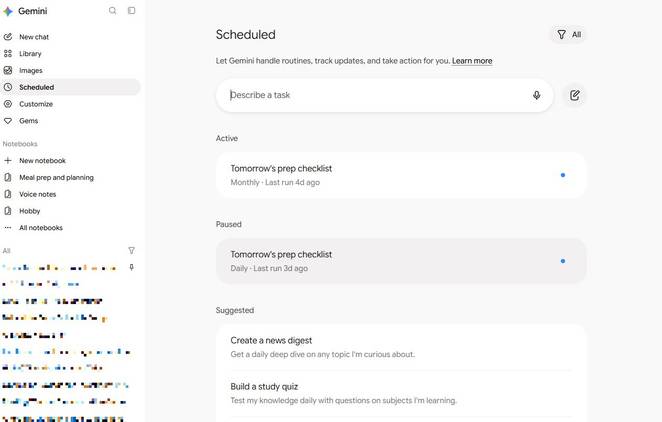
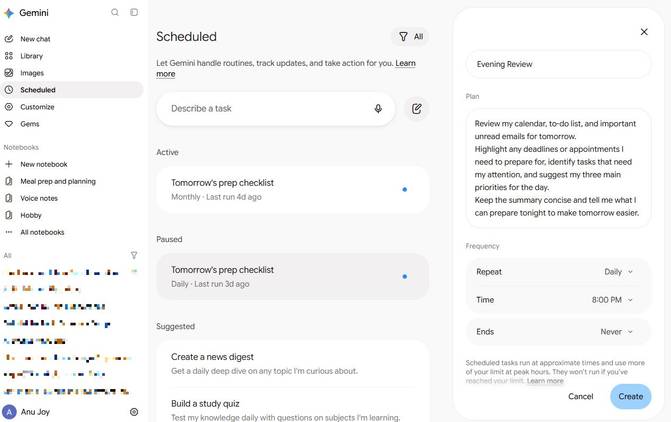
You can create scheduled actions on the Gemini website without writing a prompt in a regular chat. Go to Gemini and click in the left sidebar. Click the beside Describe a task to open the form for creating a new scheduled action.
Enter a name for your schedule, describe what you want Gemini to do in the Plan field, and choose the frequency at which it should run. After you've filled in the details, click to save it.
If you're unsure what to ask Gemini to do, or want more control over the results, enter your instructions in the Describe a task field to fine-tune the action.
Gemini also offers suggested schedules you can explore, including options to create a news digest or track financial trends. These suggestions are a useful starting point if you want to see what's possible before creating your own.
After setting up your schedules, you can return to the Scheduled page to review or manage them as your needs change.
I get tomorrow's priorities sorted before I go to bed
Start the next day with a plan
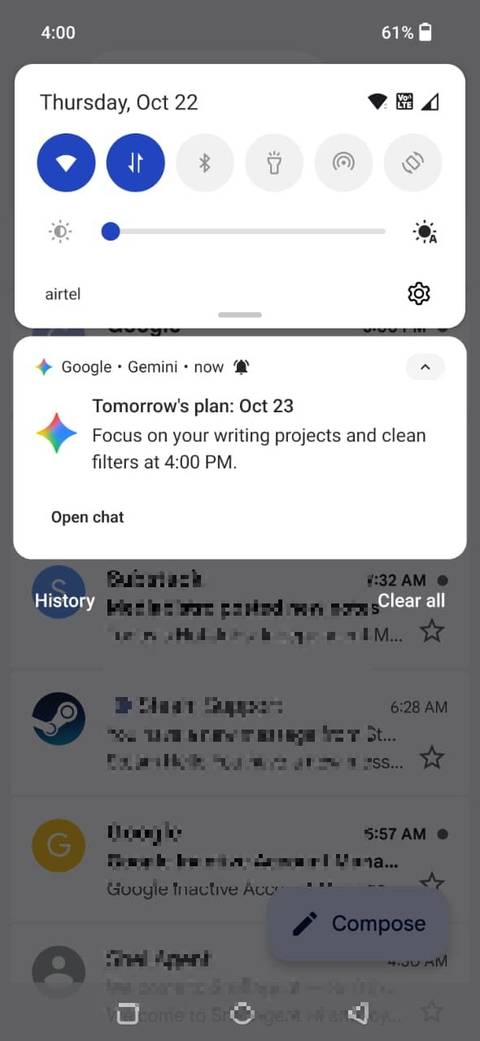
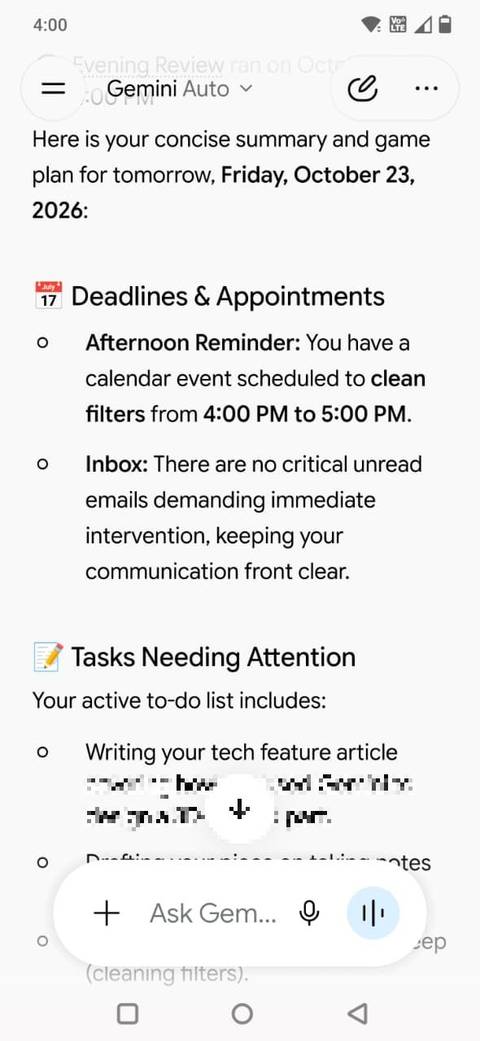
One thing that makes my day less stressful is knowing what I need to tackle tomorrow.
Instead of going to bed with a jumble of unfinished tasks and upcoming commitments running through my head, I use Gemini's scheduled actions to put together a plan for the next day.
I set it to run every evening, asking Gemini to review my calendar, important unread emails, and to-do list, highlight upcoming deadlines, and suggest the three tasks I should prioritize.
Here's the prompt I use:
Review my calendar, to-do list, and important unread emails for tomorrow.
Highlight any deadlines or appointments I need to prepare for, identify tasks that need my attention, and suggest my three main priorities for the day.
That means I can start the next morning with a clearer idea of where my attention needs to go. I can also adjust the prompt as my routine changes.
Follow news topics without doomscrolling
Let Gemini round up the stories
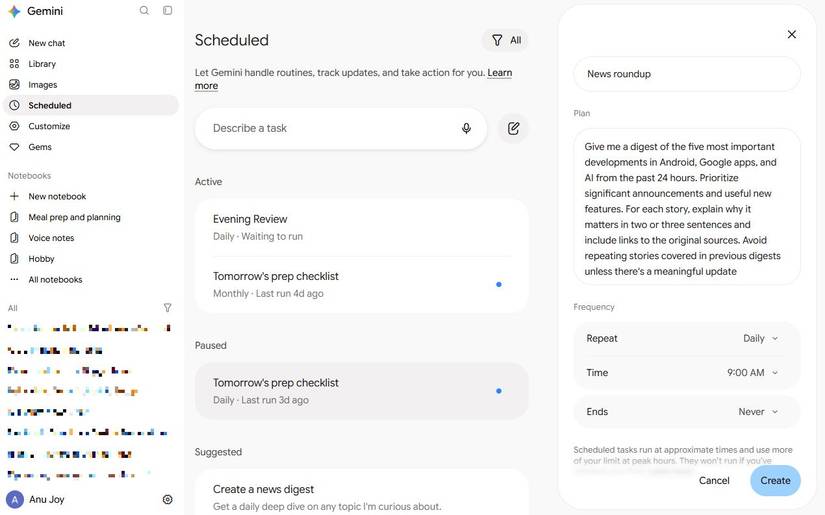
Keeping up with the news can turn into a rabbit hole. I might open an app to check for an Android update and end up scrolling through dozens of unrelated stories.
I use Gemini's scheduled actions to stay informed without making news-checking another daily chore.
I asked Gemini to prepare a digest at a set time, covering subjects such as Android updates, AI developments, the latest technology launches, and a few hobbies.
For example, I set up a schedule with this prompt:
Give me a digest of the five most important developments in Android, Google apps, and AI from the past 24 hours.
For each story, explain why it matters in two or three sentences and include links to the sources.
Avoid repeating stories covered in previous digests unless there's a meaningful update.
When the digest is ready, Gemini marks the scheduled conversation as unread and sends a notification on mobile.
Scheduled responses are prepared in advance, so they're better for staying informed about developments than tracking breaking news in real time.
For me, that's a worthwhile trade-off: I get a focused roundup of relevant stories without having to check multiple websites throughout the day.
Build a learning habit without planning every lesson
Make progress on new skills

Learning something new is often hardest when you don't know where to start. I've been learning about self-hosting, but there's a lot to wrap my head around, from choosing a home server to understanding Docker and keeping everything secure.
Rather than trying to absorb everything at once, I wanted to learn at my own pace without planning each lesson myself. That's where Gemini's scheduled actions come in.
I set up a schedule with this prompt:
Teach me one new concept about self-hosting, starting with the basics and gradually moving to more advanced topics.
Cover subjects such as home servers, Docker, running self-hosted apps, network security, and backups.
Keep each lesson beginner-friendly and end with three questions to test my understanding.
Instead of spending time deciding what to learn next, I can use each session to build on what I've already covered. I can also adapt the schedule to other subjects I'm curious about, whether that's Linux, home networking, or programming.
Find niche local events I'd otherwise never hear about
A new way to discover community events

One way to make everyday life less stressful is to get out of the house, socialize, and interact with people in my community. But finding something interesting to do can become another chore when I have to search through event listings, social media posts, and local websites.
Gemini's scheduled actions can help by putting together a regular roundup of events that match my interests, so I don't have to search for things to do every weekend.
Instead of asking for a generic list of tourist attractions, I've set up a task for niche events I'd otherwise never hear about.
Here's my prompt:
Find interesting community events and activities happening in my city over the next week.
Prioritize affordable, beginner-friendly events related to technology, books, creative hobbies, and meeting new people.
Include the date, venue, cost, registration details, and links to the original listings. Skip generic tourist attractions and include only events that appear to be upcoming.
Catch renewal notices before they cost me money
I keep surprise subscription charges to a minimum

I don't want to discover that a subscription is renewing only after the money has left my account. Renewal notices, free-trial reminders, and price-change emails can easily disappear among newsletters and promotional messages.
I've set up a weekly task with this prompt:
Check my Gmail for subscription renewals, expiring free trials, and price increases.
List the service, renewal date, amount, and any cancellation deadline you find.
Highlight anything that needs my attention and link to the original email.
This helps me catch a free trial that's about to turn into a paid subscription, notice when a recurring service increases its price, or remember to review a membership I no longer use.
Small routines can make a difference
Whether I'm keeping up with news, learning about , or finding something interesting to do over the weekend, I can set up recurring that deliver useful information when I need it.
Taking a few chores off my mental to-do list is a worthwhile improvement. The best part is that I can tailor these schedules to my interests and routines.