The Acer Googlebook 14 is the most accessible and affordable of the five Googlebooks in the initial launch line-up, bringing you a premium 14in convertible with prices starting at £999 inc VAT. Both the price and the laptop itself indicate how Googlebooks depart from existing Chromebook Plus devices. This isn't in any way a cut-price laptop. Google's Googlebook OS is new and somewhat idiosyncratic, but it's more ambitious and less compromised than Chrome OS has been in many areas. From its aluminium-magnesium chassis to its OLED screen to its Core Ultra 5 and Ultra 7 CPUs, the Googlebook 14 is designed to deliver a high-end experience akin to what you'd expect from a Pixel phone. It's informed by Google's experience with Chromebooks, but not constrained by it in the way that Google's Chromebook Plus devices were.
It's undeniably a fascinating laptop, but can it handle serious professional use? Having spent a week working on the Googlebook 14, the answer is, well, complicated.
Acer hasn't completely developed its Googlebook from scratch, which makes perfect sense. It's been churning out excellent 13in and 14in 2-in-1 laptops for over a decade, and it's not hard to see echoes of previous Chromebook Plus Spin and Swift Spin devices in the Googlebook 14. It's a lightweight 2-in-1 convertible, 1.15Kg in weight and just under 14mm thick, with a tough magnesium-aluminium body. The familiar hinge allows the screen to unfold flat against the desktop or clamp against the base in a tablet configuration, or sit with the screen outwards in a tent configuration in-between. The latter setup can be useful for entertainment purposes or for ad-hoc presentations.
The inky dark blue finish gives it a very polished, professional styling, and Acer has cleverly kept the branding minimal, and even placed the signature Googlebook glowbar discreetly in the top-left corner of the lid. This shows a colour spectrum while the Googlebook is starting, then glows dimly while it's on as a subtle battery indicator. It also changes colour while Google's Gemini AI is active, to give you some visual feedback, though of course you won't actually see it given its positioning behind the screen. That's a sign that it's more about giving Googlebooks a shared visual identity than anything really practical.
Connectivity is equally stripped-back, with just three USB-C ports and a 3.5mm audio jack. Two of the USB-C ports are 10Gbps USB 3.2 Gen 2 ports, while the third is a Thunderbolt 4/USB 4.0 port, with data transfer speeds of up to 40Gbps. There's no dedicated HDMI or DisplayPort output, but you have DisplayPort 1.4 through the slower USB-C ports and DisplayPort 2.1 through the Thunderbolt 4 port. Meanwhile, Wi-Fi 7 and Bluetooth 6 support mean you're up to date on wireless connectivity.
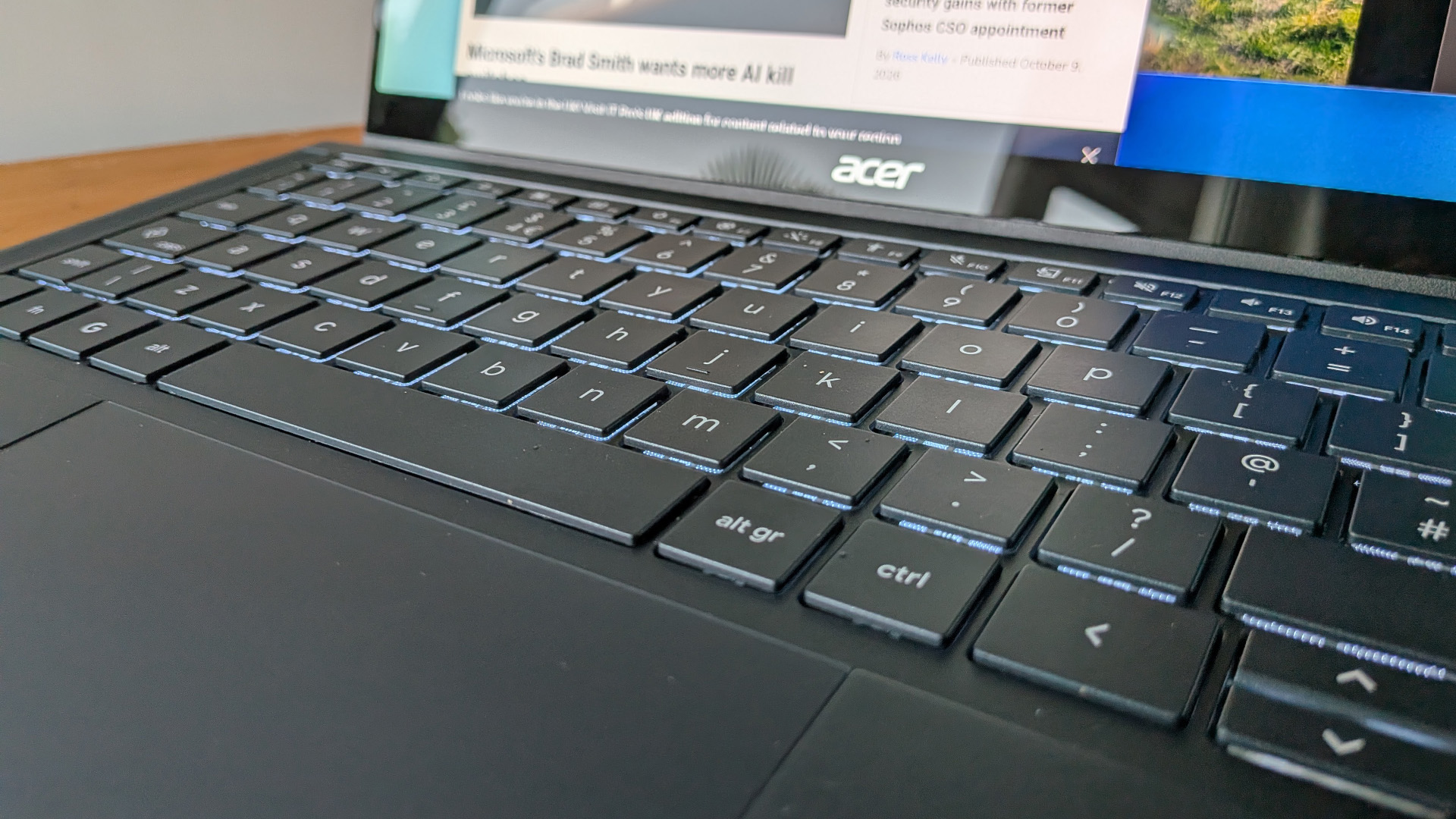
The keyboard stretches across most of the laptop's deck, flanked by two slim top-firing DTS-branded speakers. There's a slightly odd, squishy feel to it at first, but also a few millimetres of travel and a nice, crisp tactile response. In practice, it's easy to get used to and very speedy, while Google has improved on the slightly odd Chromebook layout by retaining a Delete key in the top-right corner – next to the fingerprint and power button – and by allowing what's traditionally the Caps Lock to operate as both a Caps Lock and the more Google-specific Quick Insert key. As on Chromebooks, Quick Insert is handy for accessing AI features, but sometimes you just want a simple Caps Lock. Press Fn + Caps Lock and you have one.
Meanwhile, Acer has fitted an enormous touchpad for a relatively compact laptop, spanning 125mm horizontally and 90mm vertically. It's silky smooth, sensitive, and very good at spotting gestures, which is handy as Googlebook OS gives us some new gestures to master. More on this later.
Sign up today and you will receive a free copy of our Future Focus 2026 report - the leading resource for IT decision-maker insight on priorities and investment areas in AI, security and more.
Acer has brought its A-game to its first Googlebook display, fitting a 14in 2880 x 1800 resolution OLED touchscreen with a 120Hz refresh rate. It's a beauty, especially with the Boosted color setting, giving you superb contrast, deep blacks, and extremely vibrant colors. It reaches a 541cd/m2 maximum brightness level with the Natural color setting and 609.4cd/m2 in Boosted, and it covers 100% of the sRGB color gamut with a 130% gamut volume. We couldn't replicate Acer's claimed 100% DCI-P3 coverage, but 91% isn't far off, and it also covers 89.6% of Adobe RGB. Color accuracy is solid, with an average Delta-E of just over 2.
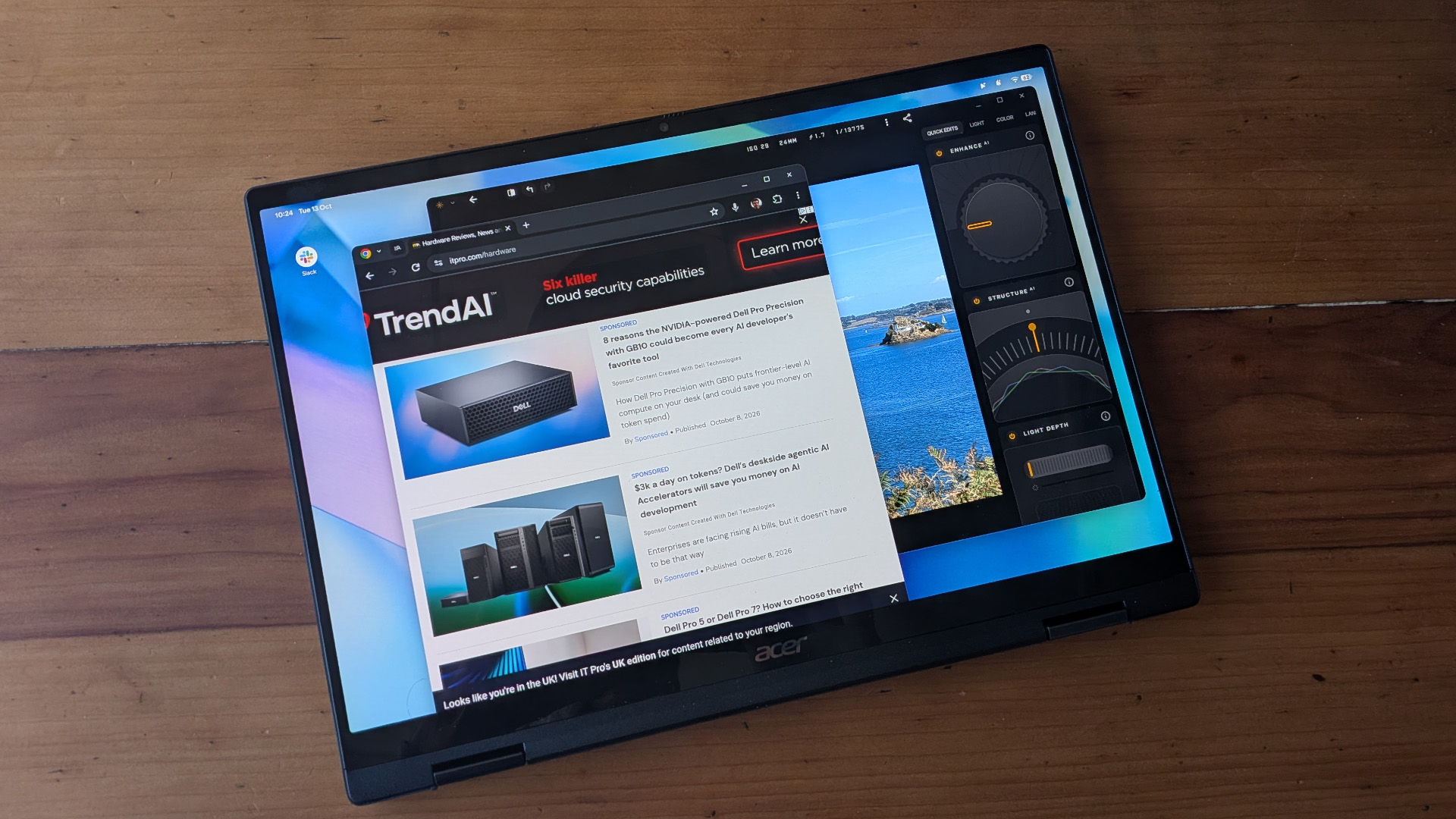
We're not at the stage where many people will be doing color-critical design work on a Googlebook, but this screen wouldn't be an impediment if you needed to. The size and resolution also makes it a great workspace for running multiple productivity apps, with crisp text and plenty of room for split-screen views and floating windows.
The audio doesn't go incredibly loud, but it stays clear and avoids growing harsh across nearly all its volume range, while there's a fairly wide stereo spread. Using the Googlebook in video meetings, we had no problems hearing others or being heard, and the 1080p camera captured clear, well-exposed video even when the lighting wasn't bright.
Acer's hardware is great, but it's Google's software that's really going to make or break the Googlebook. Googlebook OS, which now seems to be the official name, sees Google shifting focus away from the web and browser-based approach of Chrome OS to what's effectively a desktop-friendly spin on Android. Some aspects, like the way windows are handled or the toolbar, still feel very much like Chrome OS, but it uses the same Material 3 Expressive design language as Android 17 and gives Android apps the same prominence that Chrome OS gave Progressive Web Apps. Most importantly, it has a comprehensive file manager, to the extent that you can finally add folders to your desktop, creating the kind of barely organised mess that many MacOS and Windows owners know and love.
Some Chromebook users were delighted to throw away the old desktop paradigms, but if you never quite gelled with the purely cloud-focused approach, Googlebook OS can feel more straightforward and usable. You can keep using PWAs and Google Drive where that fits into your workflows, and bring in Android apps and local files where that makes more sense to you. The interface isn't a huge departure from MacOS or Windows, and multitasking features work well. The Android 17 widgets, which you can use AI to create yourself, are great for keeping crucial info in your eyeline, even if the local AI powering them can't always access the services and data that you'd like it to.
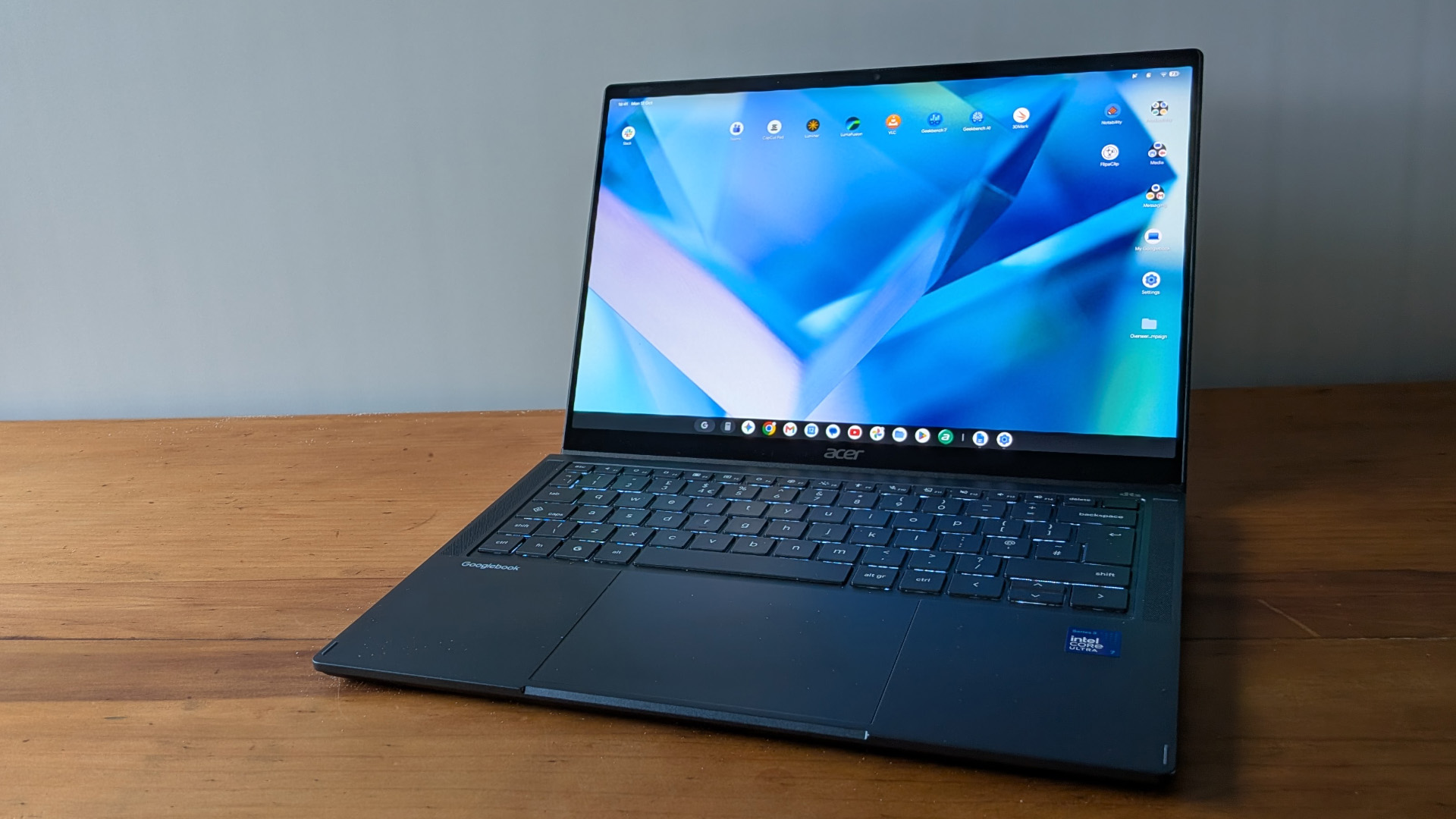
However, two things make Googlebook OS distinct. Firstly, Gemini is even more embedded here than it was with Chrome OS on Chromebook Plus devices. The app sits on the toolbar, while content-creation and summary features are never further than a two-fingered tap or a prod of the Quick Insert key away. The AI-powered Rambler voice dictation feature doesn't just accurately recognise what you say, but strips out all your awkward 'ums' and 'errs' and spots when you self-correct. Wiggle the cursor over a section of text or an image on a Web page, and it comes up with context-sensitive prompts to explain or summarize the text or talk about symbolism in the picture. Googlebook OS surfaces AI tools in a useful and appropriate way that Windows Copilot+ has never really mastered.
Secondly, it's designed to work in concert with Android smartphones. Pair the two and, provided both are working on the same Wi-Fi network, you can run your phone's apps on your Googlebook screen, read and respond to messages, and even pass tasks from your phone to your Googlebook. If there's something slightly magic about using smartphone apps you've not actually installed on your Googlebook, that goes double when you switch from your phone to your laptop and find you can carry on with your current browser page or app, just where you left off. It would be even better if it worked every time with every app, but it's still impressive.
App support is still Google's biggest issue. Googlebook OS improves on Chrome OS by having 'built for desktop' and 'optimised for desktop' apps that support the desktop UI and don't feel so much like smartphone or tablet apps. Some, like the desktop versions of Luminar or LumaFusion, actually operate like useful and functional desktop apps that you can use to get real work done. However, there's no ignoring that the Android versions of Adobe and Microsoft's apps remain reduced-functionality mobile versions, or that you're better off using Google Workspace or Microsoft 365 in your productivity workflows than the more restrictive Android apps. This won't be a problem for Workspace users, but if you're in a primarily Microsoft Office-based or Adobe-based environment, Googlebooks aren't a natural fit any more than Chromebooks were.
There's certainly nothing wrong with the performance of the Googlebook 14. We've tested the £1099 Core Ultra 7 355 configuration rather than the £999 Core Ultra 5 325 version, but it feels snappy and delivers benchmark results in line with what we'd expect from the Panther Lake chip. Due to the OS we can't run any Windows benchmarks, but it scores 2487 (single-core) and 11457 (multi-core) in Geekbench, which is in the same ballpark as the Windows-based Dell 16S, which uses the same chip. The score of 1773 in 3DMark's Steel Nomad (light) test is nothing to write home about, while the score of 20866 in Geekbench's GPU Compute test is equally mediocre. Still, the Googlebook 14 isn't likely to be employed as a graphics workstation or moonlight as a games machine.
Battery life is arguably more important, but in our usual video rundown test the Googlebook 14 lasted just only nine minutes over 14 hours. That's not a terrible result, and in a week of working the Googlebook 14 made it to the end of the working day without a recharge. All the same, it sometimes needed to be plugged in again if we had to carry on working in the evening. In this respect it's slightly behind the pace for lightweight Windows laptops, and it's going to be interesting to see how other Googlebooks compare.
Acer Googlebook 14: Is it worth it?
There are a lot of ways in which the Googlebook seems like a big step forward from the Chromebook. The Gemini and Android smartphone integration is just what we'd like to see in a forward-looking laptop. The desktop UI, apps, and file manager make it feel more like a versatile PC and less like a browser-based device with aspirations to do more.
All the same, there's a sense that the wider app ecosystem isn't really where it needs to be yet, and some inconsistencies and occasional glitches spoil the experience. Acer's hardware is fantastic, and a great way to trial Googlebooks without investing too much. However, while Google's software shows a lot of potential, it works best if you're already invested in Android, cloud-native apps, and the wider Google ecosystem. For some enterprises, that's going to be a barrier.
|
14in 2880 x 1800 resolution OLED touchscreen, 120Hz |
||
|
16GB DDR5 |
||
|
2x USB-C 3.2 Gen 2, 1x USB 4 |
||
|
1080p webcam |
||
|
512GB PCIe4 SSD |
||
|
Wi-Fi 7, Bluetooth 6.0 |
||
|
1.15Kg |
||
|
312 x 223 x 13.9mm |
||
|
71Wh |
||