The Acer Googlebook 14 is a very good first attempt at a new breed of device: the Googlebook. Thanks to the lower starting price, 2-in-1 form factor and stylish design, it’s got a good chance of being the breakout Googlebook star. The powerful components allow Googlebook OS to run smoothly, on-device AI feels much better integrated than with Windows 11 laptops, and the screen looks fantastic. However, Googlebook OS feels a little underbaked at the moment, though some of the Android ecosystem features show promise. As long as Google remains commited to Googlebooks, and continues to improve the software, then the Acer Googlebook 14 will be an excellent investment for Android users looking for a slick MacBook Air-like experience. However, the limitations of Googlebook OS mean it might not be for everyone, and battery life is a little disappointing.
Reasons to buy
Reasons to avoid
Why you can trust TechRadar We spend hours testing every product or service we review, so you can be sure you're buying the best. Find out more about how we test.
At a glance: Acer Googlebook 14

What is it?
The Acer Googlebook 14 is one of the first Googlebook devices on the market. Unlike budget Chromebooks, Googlebooks are premium laptops that run Googlebook OS, an operating system based on Android, and Acer’s model is the most affordable variant and the only one that currently offers a 2-in-1 form factor.

What does it cost?
Googlebooks aren’t budget devices like Chromebooks — they come with premium price tags. That said, the Acer Googlebook 14 is the cheapest model you can get right now, starting at $899 / £999 (around AU$1,300). This entry-level model comes with an Intel Core Ultra 5 Series 3 processor, a 14-inch OLED screen, and 16GB RAM, and in some markets, you can also get it with a more powerful Intel Core Ultra 7 processor.

The Acer Googlebook 14 launches alongside four other Googlebooks: the Asus Googlebook 14, HP Googlebook 14, Lenovo Googlebook 15, and the Dell XPS Googlebook. These laptops all have superficially similar specs, such as starting with 16GB of RAM and 512GB storage, but each one has a different selling point, be it a larger screen, thinner design, or, in the Acer Googlebook 14’s case, a 2-in-1 design.
How the Acer Googlebook 14 scored in our review
| Product | Value () | Design () | Performance () | Battery life () | Overall () |
|---|---|---|---|---|---|
| Acer Googlebook 14 | 4 | 4 | 3.5 | 3 | 4 |

Acer Googlebook 14 review: Value for money
Starting at $899 / £999 (around AU$1,300), the Acer Googlebook 14 is the most affordable Googlebook in the initial lineup, with the Dell XPS Googlebook ($999 / $1,099 / $2,399) next. It’s around $200 / £200 cheaper than the HP Googlebook 14 and Asus Googlebook 14, the two most expensive Googlebooks.
The fact that the Acer Googlebook 14 is a 2-in-1 device, whereas the more expensive Googlebooks are simply traditional laptops, makes it, in my view, an even better value. The Acer Googlebook 14, as with all other Googlebooks, gives you 12 months of Google AI Pro (worth $249.99 / £220 / around AU$480), plus three months of YouTube Premium and a year of GeForce Now game streaming.
In the UK, Acer is also offering, for ‘a limited launch window’, an Acer Mega-Hardware Pack worth £144.96 which includes a compact 100W fast charger, 5-in-1 USB-C hub, Acer wireless mouse, three-year warranty — and it’ll plant 10 trees in the buyer’s name — a nice nod to Acer’s admirable focus on sustainability. This deal was supposed to end on October 19, 2026, but I have been informed by Acer that it’s been extended until the end of November.
This helps make the Acer Googlebook 14 an even better value, and I’ve asked Acer if similar bundles are being offered in the US, and will update this review when I hear back (the Acer Googlebook 14 isn’t currently on sale in Australia, which is a shame).
- Sleek, premium design
- Lovely screen
When Google announced the first batch of Googlebooks, the company made it clear that these are premium laptops with designs to match. So, don’t think of the likes of the Acer Googlebook 14 as replacements for cheap and cheerful Chromebooks, but instead rivals to the MacBook Air, as well as Windows 11-powered ultrabooks.
That’ll be a disappointment to anyone who was hoping Googlebooks would be more affordable — perhaps rivalling the MacBook Neo when it comes to value for money. However, the Acer Googlebook 14 does look and feel like an expensive laptop, which goes some way to justifying the price.
With dimensions of 12.28 x 8.78 x 0.55 inches (312 x 222.9 x 13.9 mm), it’s slightly chunkier than the MacBook Air 13-inch (M5), though it comes with a slightly larger screen. It’s noticeably lighter than Apple’s laptop, weighing 2.51 lbs (1.14 kg), compared to the MacBook Air’s 2.7 lbs (1.24 kg).
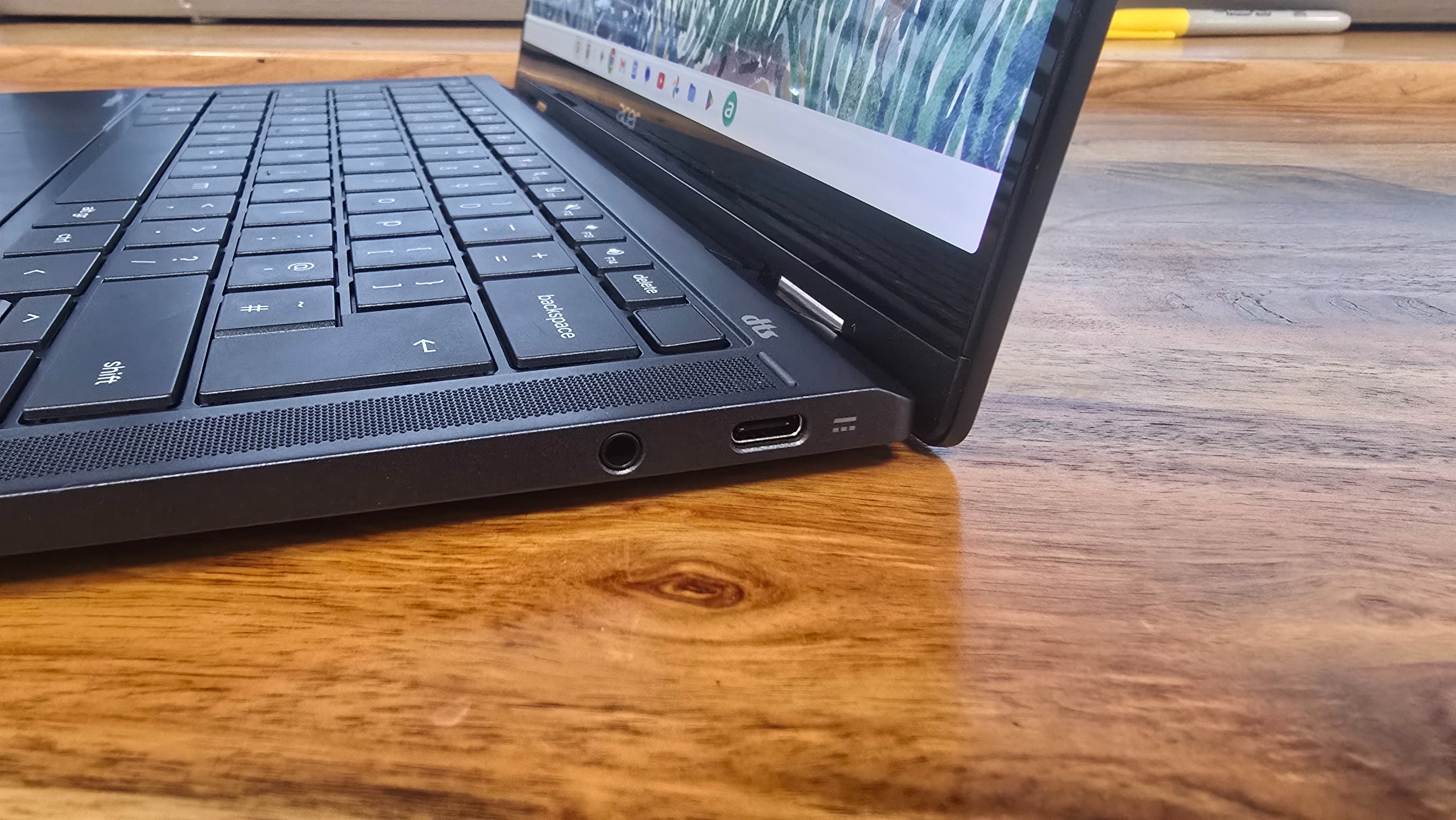
Finger print scanner
The power button includes a finger print scanner for biometric login.
360-degree hinges
The hinges allow the screen of the Acer Googlebook 14 to flip back, turning it into a tablet-like device.
The keys are large and comfortable to type on.
It’s the second lightest Googlebook, only beaten by the Asus Googlebook 14, which weighs in at just 2.2 lbs (1 kg). The body of the laptop uses a magnesium-aluminium alloy, which feels robust without being too heavy, so while the Acer Googlebook 14 feels thin and light, it also feels durable. You certainly wouldn’t feel worried about damaging it when taking it out and about with you.
While it’s not the lightest laptop I’ve ever tested, it feels comfortable to hold in one hand, and shouldn’t hurt your back if you’re carrying it around. The thin design does come with some drawbacks, namely with the port selection — you just get three USB-C ports and an audio jack. One of the USB-C ports is Thunderbolt 4, while the other two are slower USB 3.2 Gen 2 ports, so that means you’ll want to pay attention to which port you plug things into, especially if transfer speeds are particularly important.
To Acer’s credit, three USB-C ports are an improvement on the two ports a lot of similarly-priced thin and light laptops offer (such as the aforementioned MacBook Air, though both those USB-C ports are Thunderbolt 4). If you need to charge the Acer Googlebook 14, however, one of those USB-C ports will need to be sacrificed.
The screen is a 14-inch OLED touchscreen with a sharp resolution of 2880 x 1800 and an aspect ratio of 16:10 (so it’s a little taller than standard widescreen displays). It looks fantastic, and really helps give the Acer Googlebook 14 a premium feel. As a touchscreen, it’s nice and responsive, and it also means that when using Android apps (which you can install directly onto the Acer Googlebook 14) designed to be used with a touchscreen, they work really well. The bezels on either side of the screen are nice and thin, which gives the Acer Googlebook 14 a modern feel, while also maximizing screen size without making the laptop too bulky.
At the top of the screen is a 5MP webcam with a physical privacy shutter that you can slide to turn off the camera, which is a reassuring feature. The keyboard feels nice and responsive, with a decent travel for each key when pressed. The keys are well spaced, so when typing quickly you can still accurately hit the keys you want. They are also backlit, so using the Acer Googlebook 14 in darker environments isn’t an issue.
There’s also a biometric fingerprint scanner included in the top-right corner of the keyboard for logging in quickly and securely. It works well, though it doesn’t feel quite as quick as the Touch ID button on modern MacBooks.
The Acer Googlebook 14 features a large glass touchpad that takes up around a third of the space below the keyboard, and it responds well to gestures.
On the back of the laptop lid is an understated Acer logo, along with the ‘Glowbar’, which is a thin horizontal line that lights up and changes color depending on what you’re using the Googlebook for. The Glowbar appears on all Googlebooks, though its placement on the lid varies (on the Acer Googlebook 14, it’s located in the corner opposite Acer’s logo).
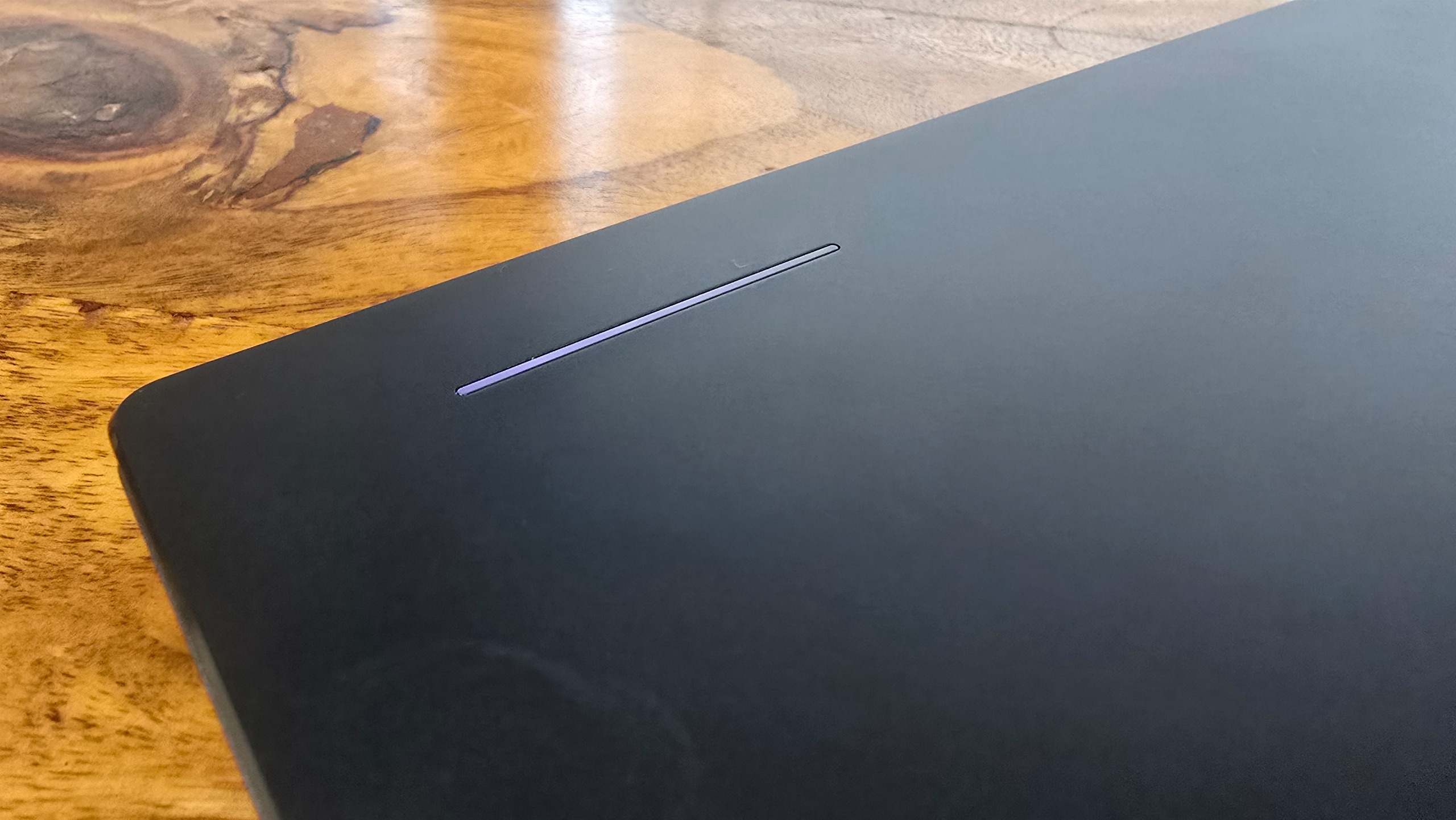
When you plug in the Googlebook, the bar can display the battery level, and it flashes different colors when using the built-in Gemini AI helper. It adds a bit of interesting color to what would otherwise be a rather plain dark rectangle, and while I like the idea of the Glowbar showing the battery level when it charges, it only does so briefly. Also, when using the Acer Googlebook 14, the screen will be open, which means the Glowbar is facing away from the user, so I’m not quite convinced how useful this feature will be (this is an issue with all Googlebooks, not just Acer’s).
What really makes the Acer Googlebook 14 stand apart from the other Googlebooks it launched alongside is that it’s the only one that has a 2-in-1 form factor. Not only can it be used as a traditional laptop, but the screen can be folded back, turning it into a tablet-like device. Because Googlebook OS can run Android apps, both natively and streamed from your Android smartphone, this could be a big selling point for the Acer Googlebook 14. Thanks to the thin design, the Acer Googlebook 14 doesn’t feel too chunky when used in tablet mode, though it’s thicker and heavier than a regular Android tablet.
Android apps I tried on the Acer Googlebook 14 looked fantastic thanks to the OLED screen, with Netflix and Instagram adjusting themselves quickly depending on if I was holding the screen vertically or horizontally. Google Chrome, the default web browser, also worked well, and holding the Acer Googlebook 14 vertically meant I could read webpages with a lot less scrolling.
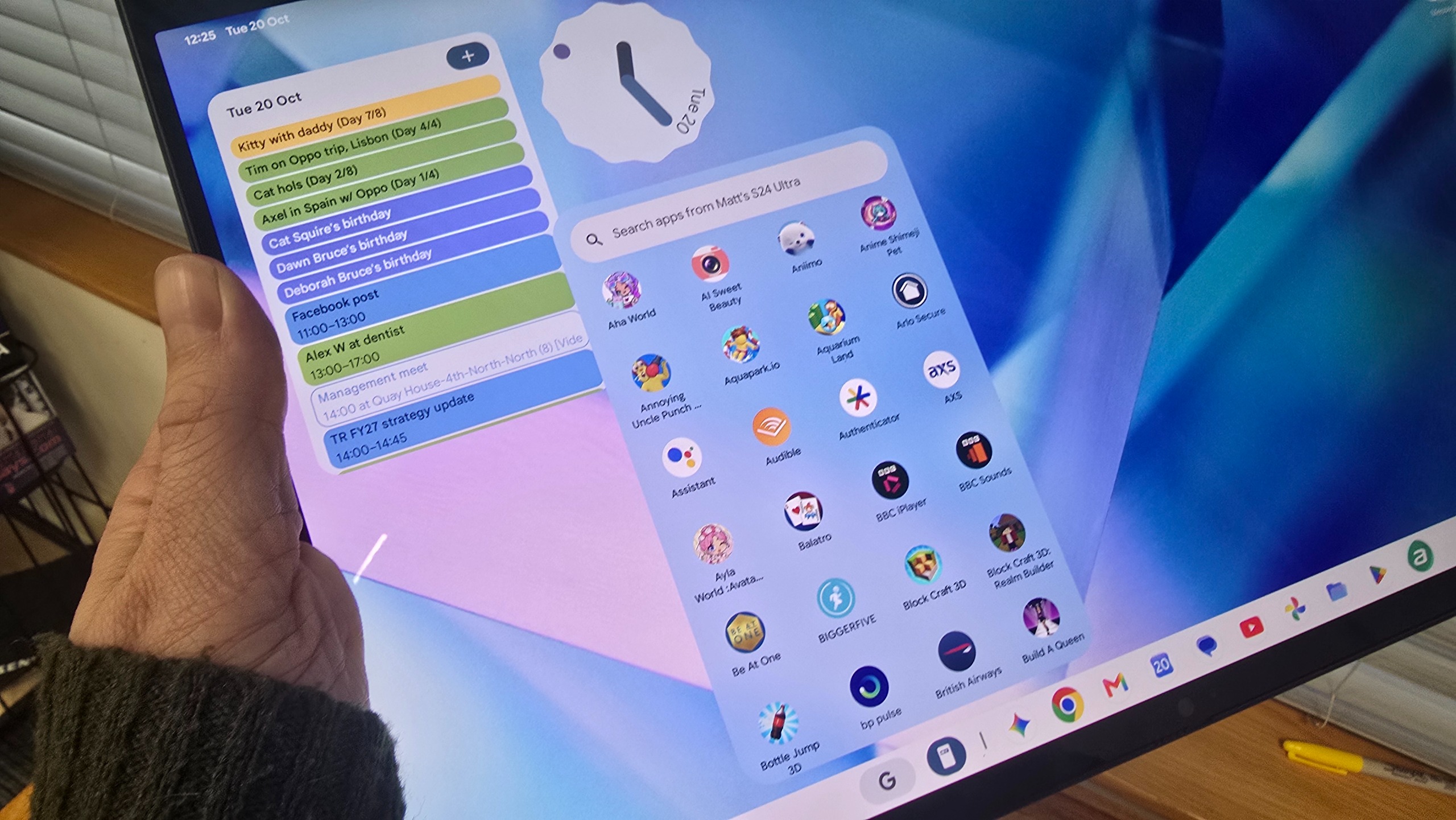
There is a slightly strange issue, however. While all the apps I tried did indeed change their orientation depending on how I held the Acer Googlebook 14, the desktop screen didn’t change — it stayed in its landscape orientation, and that meant launching apps either from the desktop or the App Drawer (essentially, Googlebook OS’ answer to Windows’ Start menu, and will be familiar to most Android users) was rather clunky — you either had to rotate the Acer Googlebook 14 back into landscape mode to comfortably launch an app, or just try to launch it with the user interface at the wrong angle.
It's a weird omission — Windows 11 has no issue with rotating its entire interface when you rotate the screen it’s on, and I had been expecting Googlebook OS to do the same. I mentioned this to Acer, and it shared the following:
"Acer Googlebook 14 is the first convertible device to run the new Googlebook OS. For the initial launch, Google has chosen to lock the app tray/taskbar in landscape orientation, as its usage data for convertible devices indicates that landscape is the most commonly used orientation. For additional information and support, please refer to the Google Help Center”
This is a bit of an odd decision by Google — sure, there’s only one 2-in-1 Googlebook at the moment, but that’s still 25% of the currently available Googlebook market. Hopefully this changes soon, as it does make the Acer Googlebook 14’s major selling point less enticing. If I were Acer, I wouldn’t be too thrilled about that.
|
14-inch OLED WQXGA+ (2880 × 1800), 16:10 touch display; Corning Gorilla Glass; 500 nits; 100% DCI-P3; VESA Certified DisplayHDR True Black; EyeSafe 2.0; USI 2.0 Stylus ready |
14-inch OLED WQXGA+ (2880 × 1800), 16:10 touch display; Corning Gorilla Glass; 500 nits; 100% DCI-P3; VESA Certified DisplayHDR True Black; EyeSafe 2.0; USI 2.0 Stylus ready |
|
|
16 GB LPDDR5X |
32 GB LPDDR5X |
|
|
512 GB PCIe Gen 4 NVMe SSD |
512 GB PCIe Gen 4 NVMe SSD |
|
|
71 Wh 4-cell Li-ion; Fast-charging capability |
71 Wh 4-cell Li-ion; Fast-charging capability |
|
|
1× Thunderbolt 4; 2× USB 3.2 Gen 2 Type-C (10 Gbps, DisplayPort, Power Delivery); 3.5 mm audio jack |
1× Thunderbolt 4; 2× USB 3.2 Gen 2 Type-C (10 Gbps, DisplayPort, Power Delivery); 3.5 mm audio jack |
|
|
DTS Audio with dual upward-facing Acer Ultra Boost Stereo speakers; triple digital microphone array; 5 MP webcam with privacy shutter |
DTS Audio with dual upward-facing Acer Ultra Boost Stereo speakers; triple digital microphone array; 5 MP webcam with privacy shutter |
|
|
Wi-Fi 7; Bluetooth 6.0 |
Wi-Fi 7; Bluetooth 6.0 |
|
|
312 (W) × 222.9 (D) × 13.9 (H) mm; 1.14 kg (2.51 lbs) |
312 (W) × 222.9 (D) × 13.9 (H) mm; 1.14 kg (2.51 lbs) |
- Feels fast
- Screen looks great
Google has been keen to highlight that Googlebooks, like the Acer Googlebook 14, are simply fancy Chromebooks, but an entirely new product category, and I have to say, from my initial impressions, the Acer Googlebook 14 and its fellow Googlebooks are certainly ambitious. The hardware is excellent, and the model Acer sent me to review features a cutting-edge Intel Core Ultra 5 325 processor and 16GB of LPDDR5X memory, plus a 512GB SSD.
That’s the kind of spec that would do well in a Windows 11 laptop, and Googlebook OS is supposed to be far more lightweight (being partially built on Android), so performance should be even better.
It certainly feels fast and responsive when opening apps and browsing the internet. Finding and installing apps via the Play Store is quick and easy, and familiar to anyone who’s used an Android device. Apps and games that have interfaces designed for desktop use (rather than simply being the Android mobile app in a window) have been tagged, so you should know if an app will work particularly well with the Acer Googlebook 14, which is a nice touch.
How the Acer Googlebook 14 performed in our suite of benchmark tests
| Product | Crossmark: Overall (Score) | Crossmark: Productivity (Score) | Crossmark: Creativity (Score) | Crossmark: Responsiveness (Score) |
|---|---|---|---|---|
| Acer Googlebook 14 | 3647 | 4406 | 1788 | 15038 |
| Product | Geekbench 6.7 (Single-core) (Score) | Geekbench 6.7 (Multi-core) (Score) | Geekbench 7.0 (Single-core) (Score) | Geekbench 7.0 (Multi-core) (Score) |
|---|---|---|---|---|
| Acer Googlebook 14 | 2465 | 9960 | 2427 | 11416 |
| Product | Geekbench AI 1.7: TenssorFlow Lite / CPU ( Single Precision Score) (Score) | Geekbench AI 1.7: TenssorFlow Lite / CPU ( Half Precision Score) (Score) | Geekbench AI 1.7: TenssorFlow Lite / CPU ( Quantized Score) (Score) |
|---|---|---|---|
| Acer Googlebook 14 | 1801 | 1847 | 2332 |
| Product | Jetstream 2 (Score) | WebXPRT 4 (Score) |
|---|---|---|
| Acer Googlebook 14 | 444 | 328 |
| Product | 3DMark: Wild Life Extreme (Score) | 3DMark: Solar Bay (Score) | 3DMark: Steel Nomad Light (Score) |
|---|---|---|---|
| Acer Googlebook 14 | 4068 | 9071 | 1780 |
That said, when I launched , a popular Android game that supposedly has been updated to work well on Googlebooks, I first had to map touch controls to the keyboard in a rather clunky and confusing manner (and as far as I know, all Googlebooks will come with touchscreens).
Skipping through the mapping process took me to the game, and I found using the touchpad and mouse cursor to interact with the game worked absolutely fine, so I’m not too sure what the point of the confusing mapping process is. Also, despite being labelled as being designed for desktop use, the game initially launched in a window in portrait orientation — so essentially, just showing the Android app. Even maximizing the app window didn’t make it go full screen.
I then tried the Acer Googlebook 14 in tablet mode (thinking that would be ideal for a mobile game), but for some reason, the auto-rotate function didn’t work, even when I toggled it on and off. Then, all of a sudden, it work, though it asked me to restart the app ‘so that it looks better on your screen’. I did (luckily not losing any progress), and the Acer Googlebook 14 acted as it should. However, the game didn’t take up the entire screen, even in fullscreen mode — instead, it had the (admittedly larger) app in the middle of the screen, then large black borders around the edges. Restarting the app did give me the full-screen experience, but this is far from a slick and premium experience.
Now, I want to be clear that these issues are related to the software, so it’s not really Acer’s fault. Googlebook OS is clearly still in its early days, and while I didn’t experience any major crashes, there’s still a lot of work to be done by Google, and unfortunately it means that the main selling point of the Acer Googlebook 14 — its 2-in-1 design — isn’t as impressive as it should be.
This also extends to some of the more interesting promises of Googlebook OS. The operating system is designed to be familiar for Android users, and aims to give a similarly slick experience that iPhone users get when using a Mac, such as screen mirroring, seamless switching between devices, and seeing messages your phone receives on your laptop’s display.
When Google launched the Googlebooks a month or so ago, I was shown how the apps on a connected Android phone could be opened on a Googlebook without any installation. Another demo showed someone using an app on their phone, then quickly switching to their Googlebook to continue using the same app where they left off. It was impressive, and something that, as an Android user, I’d been wanting for years. Only Samsung came close, and even that was a bit clunky (and you needed to have a Samsung phone Samsung laptop).
So, I was disappointed when I just could not get the Acer Googlebook 14 to show the apps on my Samsung Galaxy S24 Ultra. Instead, I was given a QR code to scan, which opened up the ‘Cross-device services’ settings on my smartphone. These were already enabled, and it wasn’t clear what I needed to do. Again, it was far from the slick experience I (and other Android users) had been promised.
After speaking to Acer, I was pointed to a Google support page which announced that Googlebook OS support for Samsung phones has now begun to roll out, and that phones need to run Android 17 (and in the case of Samsung smartphones, also run One UI 9.0). My phone was actually on a slightly older version, but the One UI 9.0 update was waiting to be installed, which I did. I was then prompted (after scanning the QR once again) to update Cross-Device Services. Progress!
It took a while, but I was then able to see my phone’s apps on the Acer Googlebook 14. Clicking on an app brought it up on the screen with a desktop-like interface, though it took a few seconds. This is because the Acer Googlebook 14 is streaming the app wirelessly from your phone, so there’s a little delay, but then you get the app in the exact state you left it on your phone.
With the phone properly connected, you can also view its files within the file explorer app on the Acer Googlebook 14, as well as files saved on the Googlebook’s internal drive, and any Google Drive accounts you have as well. This is another nice bit of interaction between Googlebook OS and your Android device, though again there’s a bit of a delay as the Googlebook streams files from your phone.
Having your Google Drive folders within the file explorer (called ‘Files’) app is another nice touch — as long as you use Google Drive. As an Android user, there’s a good chance that you use Google Drive, especially as new owners of Googlebooks get a year’s subscription to Google AI Pro for free, which includes 5TB of storage. I actually mainly use OneDrive, and I was pleased to see that once I had logged into the OneDrive app on the Acer Googlebook 14, the files I store on Microsoft’s rival cloud storage service also appeared within the Files app.
So, the Googlebook OS and Android ecosystem feels like it needs tightening up a bit, as this is still early days, but there’s a lot of potential here, and if Google can nail it, it will make Googlebooks like the Acer Googlebook 14 attractive to people who use Android smartphones.
On-device AI is a big selling point of Googlebooks, and with the included Google AI Pro subscription, you get access to Gemini Argon, Google’s latest AI model. I had a play around with it on the Acer Googlebook 14, asking it to help me code a complex musical plugin for Ableton Live 11, and it was quick and helpful, explaining its process and offering suggestions and advice. Even with Google AI Pro, I did use up my current allowance in around 10 minutes. At least it resets every five hours.
The ’Magic Cursor’ feature is another key selling point (according to Google) of the Googlebook OS. Once you’ve turned it on, you can shake the mouse cursor, and Gemini can view what’s on your screen. You can highlight parts of the screen and ask Gemini questions about it. I tried it while I had a photo open, and it offered to generate digital art based on the photo, or come up with gift ideas for the people pictured.
It is similar to the ‘Click to Do’ feature of Windows 11, but that takes a screenshot of your screen, then offers limited ways to interact with it. The Magic Cursor feature feels much more flexible, as you’re interacting with live elements of the screen, and highlights the benefits of Googlebook OS being built from the ground up to support AI, rather than having AI awkwardly pasted onto an existing operating system, as with Windows 11.
Overall, the day-to-day performance of the Acer Googlebook 14 was very good, though the early nature of Googlebook OS means some features aren’t quite as slick as I’d have hoped.
Battery life results
How long does the battery last?
Battery life web surfing test
| Product | Value |
|---|---|
| Acer Googlebook 14 | 10.416666666666666 |
Because Googlebook OS has been designed as a lightweight operating system, similar to Chrome OS, I was expecting very good results from the Acer Googlebook 14’s battery.
Acer suggests that it will last up to 14 hours for local video playback and up to 16 hours of web browsing. In our battery benchmark tests, which replicated moderate web browsing activity, the Acer Googlebook 14 in fact lasted for just under 10 and a half hours.
This is below what Acer claims, but it’s not bad — expect the Acer Googlebook 14 to last well over a single work or school day on battery, and with some tweaks you should be able to get a few more hours out of the battery.
Should I buy the Acer Googlebook 14?
Buy the Acer Googlebook 14 if...
✅ You have an Android smartphone and need a new laptop
The Acer Googlebook 14 works really well with Android smartphones thanks to some great features of Googlebook OS, such as streaming apps from your phone to the laptop. Just check compatibility before you buy.
✅ You were thinking of buying an Android tablet as well
Thanks to its 2-in-1 design and ability to run Android apps natively, the Acer Googlebook 14 offers a great way to save a bit of money and have a device that can act as both a laptop and an Android tablet.
✅ You’re all-in on Google’s AI ambitions
Google’s Gemini AI is tightly integrated into the Googlebook OS software, so if you already use it a lot, then you’ll love the Acer Googlebook 14.
Don't buy the Acer Googlebook 14 if...
❌ You rely on a certain Windows or macOS app
While Googlebooks can run web apps and thousands of Android apps, it can’t run Windows or macOS apps. In the future, devs might make Googlebook OS-compatible versions, but that’s not guaranteed, so if there’s a critical app you rely on, you should look elsewhere.
❌ You have an iPhone
So many of the Acer Googlebook 14’s benefits are tied to having an Android phone, and while there are some features that work with iPhones, you’ll be missing out on a lot — and you’d be much better off getting a MacBook, anyway.
Also consider
- Exquisite design
- Glorious large display
- Respectable graphical performance
- Not the lightest
- Lacks ports
- Heavy keys
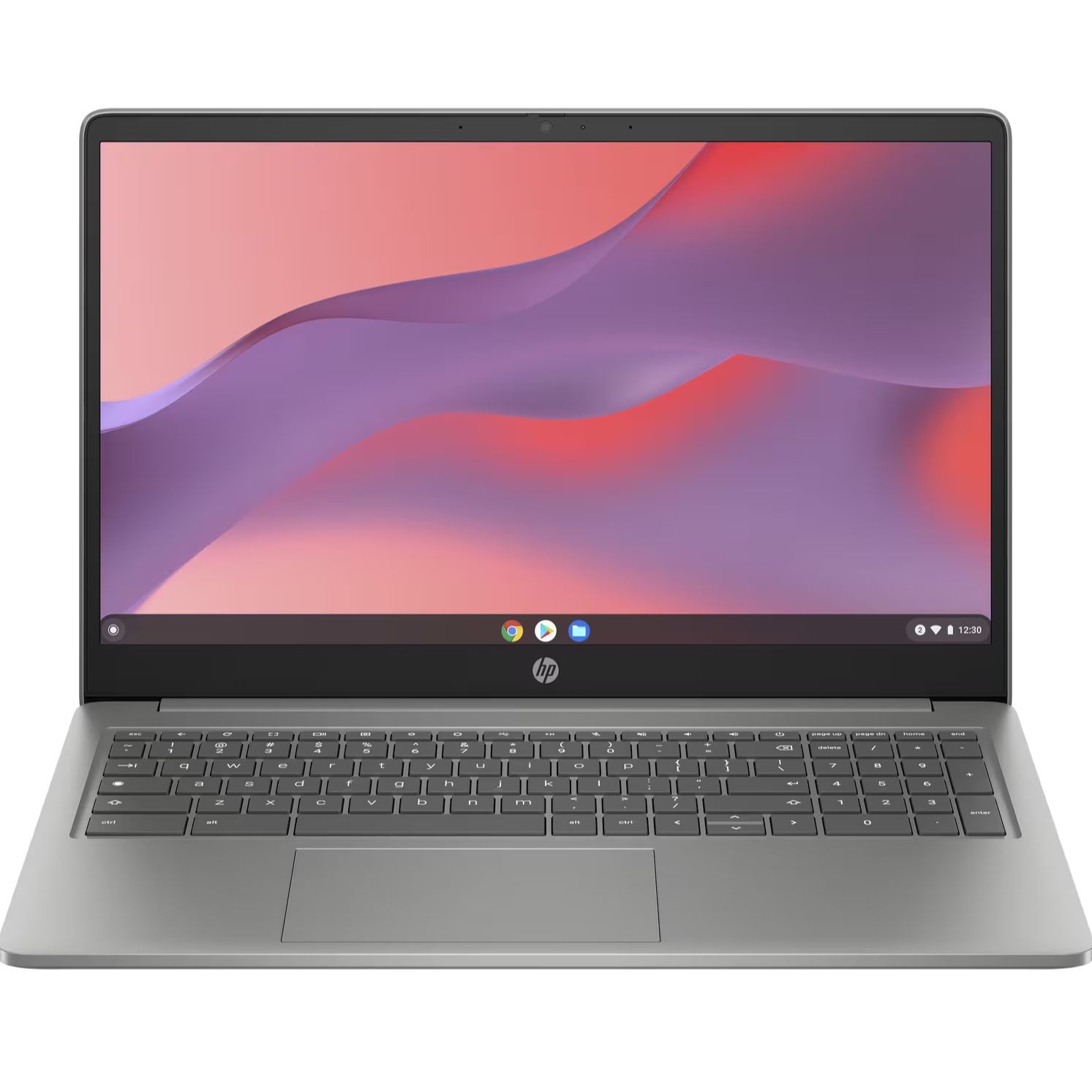
- Great all-round performance
- Good display for a Chromebook
- Premium build quality
- Small lid opening angle
- Not convertible
- Typing can feel cramped
How I tested the Acer Googlebook 14

- Used as main work laptop for several weeks
- Travelled with it
- Connected it up to my Android smartphone
I used the Acer Googlebook 14 for several weeks, for all manner of tasks, including writing some of this review on it. During that time, I also connected my Android smartphone to it to make full use of the ecosystem. I ran a variety of apps and games on the Acer Googlebook 14 during my time testing it.
I also attended Google’s launch event in London, as well as Acer’s own event, for deep dives into the technology and features. I’ve been reviewing laptops, including Chromebooks, for nearly 20 years, and have used that experience to inform my review.
Matt is TechRadar's Managing Editor for Core Tech, looking after computing and mobile technology. Having written for a number of publications such as PC Plus, PC Format, T3 and Linux Format, there's no aspect of technology that Matt isn't passionate about, especially computing and PC gaming. He’s personally reviewed and used most of the laptops in our best laptops guide - and since joining TechRadar in 2014, he's reviewed over 250 laptops and computing accessories personally.