I've tried many note-taking apps over the last decade. I used for quick ideas, Notion for dashboards, and Obsidian for long-form projects.
Still, no matter how polished or powerful those apps felt, they all shared the same limitation: they depended on how much effort I put in.
Note-taking isn't the hard part; processing the notes is. That's why pairing Gemini Notebook with YouTube made things easier.
Here's how it helped me learn faster.
YouTube videos finally slowed down enough for me to learn from them
Gemini Notebook can fill in the blanks
YouTube has been my go-to app for learning anything visual, whether it's fixing something at home, understanding a new software tool, or studying a complex concept.
However, I struggled to keep up because of the . Creators move fast, skip steps, or assume viewers can follow along in real time.
Although I could rewind or slow the playback, it broke the flow.
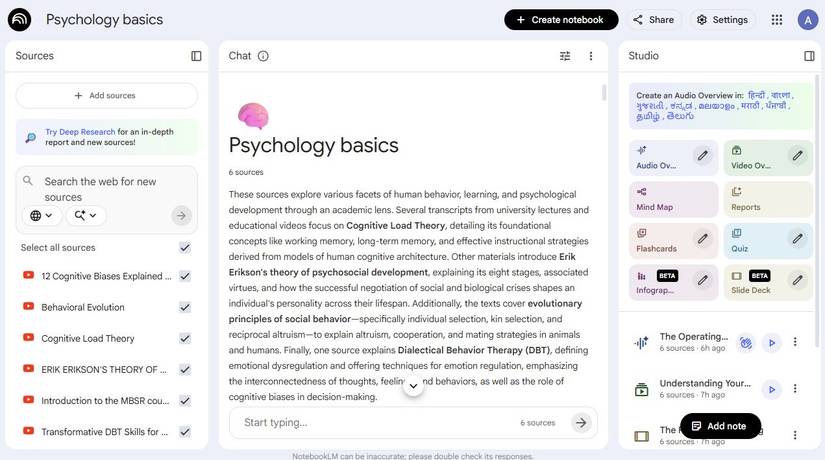
Pairing YouTube with Gemini Notebook changed everything. Instead of struggling to keep up with the video, I add the link and let Gemini Notebook turn the creator's rapid-fire explanations into something I can digest.
If a section moves too quickly, I ask Gemini Notebook to expand that part. If I missed a foundational idea earlier in the video, I can connect the dots.
Turning multiple videos into one cohesive lesson
It's like having a personal tutor
Learning from YouTube used to feel like I was jumping from one topic to another without retaining most of the information.
Gemini Notebook let me stitch those lessons into something that made sense.
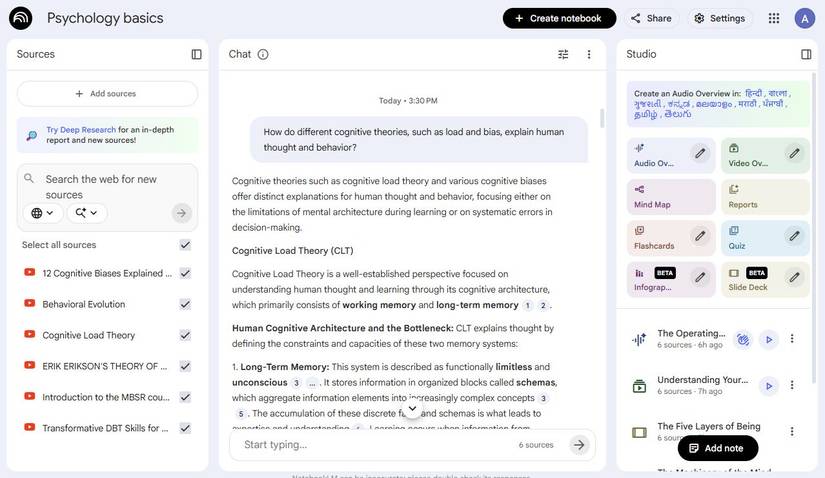
When I wanted to learn the fundamentals of psychology, I fed Gemini Notebook a batch of videos on cognitive biases, attachment styles, reinforcement theories, habit loops, and emotional regulation.
It helped me link ideas across creators. For instance, how confirmation bias ties into anxious attachment, or how reinforcement theory can replace unhealthy coping habits.
It formed a kind of "master lesson," pulling patterns from hours of content and making everything feel more linear.
The best part is that it breaks down themes, highlights contradictions between creators, and shows how each piece of information relates to the others.
Now, I have a single, organized explanation that ties everything together.
Use the YouTube to Gemini Notebook Chrome extension to speed up your workflow
Get work done across all your devices
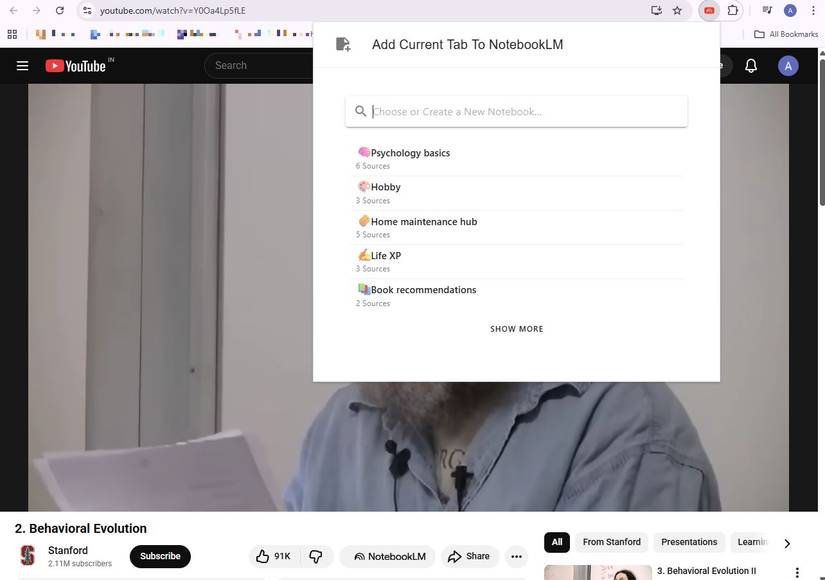
One of the most powerful upgrades to the Gemini Notebook + YouTube workflow is the YouTube to Gemini Notebook Chrome extension.
Instead of copying URLs manually or juggling tabs, the extension lets you send any YouTube video or playlist to Gemini Notebook with a single click.
When I'm watching a personal finance or psychology playlist, I use the extension to add videos to Gemini Notebook.
Build a mind map that keeps everything connected
Show the relationships between topics
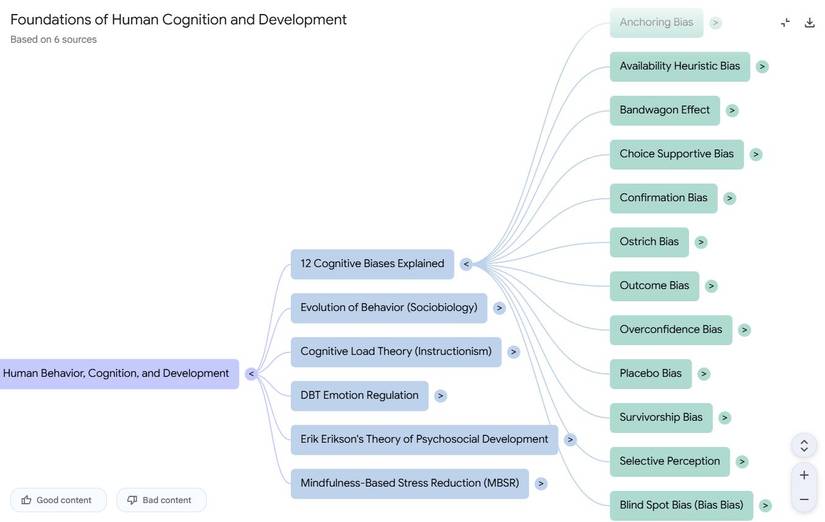
One of the most unexpectedly powerful results of pairing Gemini Notebook with YouTube is how easily it can turn video insights into a visual map of connected ideas.
Mind maps help when you're learning complex topics that branch into multiple subtopics.
Instead of trying to draw connections between the videos you watched, the Mind Map lays everything out: the core topic in the center, major concepts branching outward, and supporting details neatly under each section.
What makes this so helpful is that Gemini Notebook builds its maps based entirely on the material you feed it.
If one video explains cognitive biases with real-world examples while another dives into the science behind them, the mind map shows how those ideas interact.
If you're learning personal finance, you'll see how budgeting leads to cash flow, which leads to emergency funds, which then connects to insurance or investments.
I also liked using the mind map as a quick refresher. Before watching my next YouTube video on a topic, I'd skim the map and instantly recall where I left off.
Using Audio Overviews to reinforce what you watch
Refresh your mind with a quick summary of a video
One of Gemini Notebook's most underrated features is how well the Audio Overview works when you're learning from YouTube videos.
It condenses the material into a digestible, podcast-like summary. It's perfect for reinforcing concepts without rewatching an hour-long video.
Sometimes I'll listen to the overview while commuting, cooking, or walking. If I hear something I want to revisit, the interactive transcript lets me jump right to that moment.
It's like having the YouTube video in audiobook form.
Tips for getting more out of Gemini Notebook and YouTube
Boost your knowledge with pop quizzes
I learned quickly that the outcome depends heavily on how you set things up.
Before adding anything, I skim a channel's playlist, choose videos that build on one another, and add them to a fresh notebook rather than mixing them with older notes.
This keeps Gemini Notebook focused.
I also realized that better prompts make a huge difference.
Instead of writing, "Explain this video," I'll ask Gemini Notebook to teach the topic to a beginner or list what I should understand before moving to another video.
When I want tighter reinforcement, I ask it to generate short quizzes or scenario-based questions based on the imported clips.
The fastest way I've learned from YouTube so far
I finally had a system that slowed down fast-paced content and turned multiple creators' explanations into a cohesive lesson.
It also lets me explore topics through mind maps, audio overviews, and .
And because Gemini Notebook saves all the summaries, mind maps, and Audio Overviews, I can revisit lessons instead of forgetting them the moment the video ends.