Almost nothing uses it yet.
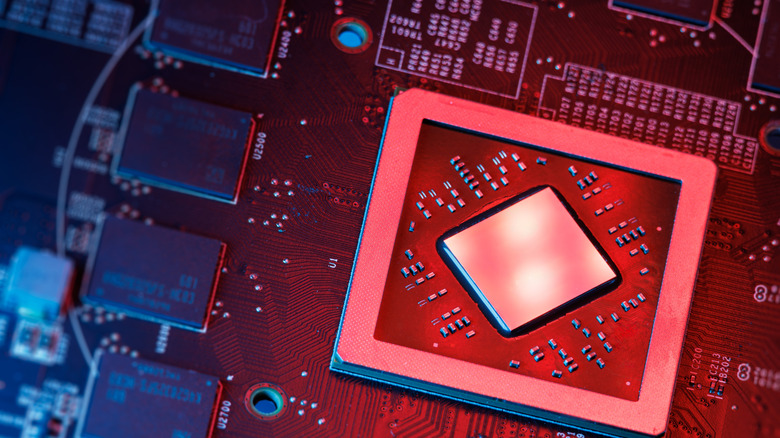
Bought a new laptop recently? Chances are that it's equipped with an NPU, a chip you're almost certainly not using. The NPU, or Neural Processing Unit, is a block of silicon that runs AI workloads at a fraction of the power a CPU or GPU needs. Roughly 2W compared to well over 100W that standard laptop discrete graphics need to do the same job. While they're not yet found in all laptops, they're now pretty much standard in mid-range and premium machines.
Advisory firm Gartner reckons that AI-capable PCs, like these NPU-equipped laptops, make up more than half of total global shipments. The reason we're seeing this isn't because buyers want or need them, but to align with certification requirements. Back in 2024, Microsoft pretty much dictated that laptop makers will need to hit 40 TOPS (the measure of how quickly an NPU can chew through AI math) of dedicated NPU performance with new machines, or risk losing access to new Windows AI features. NPU hardware is now flying off the shelves as a result, but software is lagging behind.
NPUs are used for AI inference
An NPU's job is to accelerate inference. That's the "run this model" phase rather than the GPU-powered "train this model" phase. Neural networks rely heavily on two kinds of computation to do this: matrix multiplication and nonlinear activation functions. NPUs are purpose-built to execute those operations as quickly and efficiently as possible, but that comes at the cost of some general-purpose CPU and GPU flexibility.
Let's consider the example of using background blur on a video call. Most of us have used this, and it can run on either a CPU or GPU. But both draw a lot of power, generating heat and sapping battery life on a thin portable. An NPU performs the same work using a fraction of the energy, so features like webcam effects can run continuously without draining the battery or spinning up fans.
NPUs are obviously no good for training AI models, and to run large local LLMs like Llama 70B, you'll still need a discrete GPU with a decent chunk of video memory. They're also not needed for services like ChatGPT or Gemini because those run on provider infrastructure. Their actual use case, at least for now, is a small number of always-on and low-power use cases like webcam effects, noise suppression, real-time translation and local search indexing.
How to tell if your laptop has an NPU
The reason we're seeing so many laptops featuring NPUs is because of Microsoft's Copilot + PC certification. Laptop makers can only earn it and unlock certain on-device Windows AI features if their laptops have a 40 TOPS NPU, plus 16GB of RAM and 256GB of storage. That 40 TOPS figure also has to come from the NPU, not a GPU; a mid-range laptop RTX 4050 offers north of 190 TOPS from its tensor cores. That doesn't count.
Qualcomm's Snapdragon X Elite and Plus chips were the first to market with a 45 TOPS Hexagon NPU. That was soon followed by Intel's Lunar Lake with up to 48 TOPS, and AMD's Ryzen AI 300 at 50 TOPS. Intel's newer Panther Lake processors, known as Core Ultra Series 3, come with a 50 NPU TOPS on Intel's 18A process. Later this year, Qualcomm has since pushed that to as much as 85 TOPS with Snapdragon X2 Elite, more than double Microsoft's specified minimum. Every generation has ratcheted the number higher even though software to consume those TOPS remains scarce. Soon, AI laptops may well be the only option available, making NPUs unavoidable. We've already seen Dell stuff an enterprise-grade NPU into its Pro Max Plus laptop.
If you've got an NPU-equipped laptop, you can see its utilization rate via Task Manager on Windows 11. On my laptop — a 2024 ASUS Zenbook Duo UX8406 in a 32GB RAM configuration — this sits at zero, and I'd imagine that to be the case on all casual user machines.
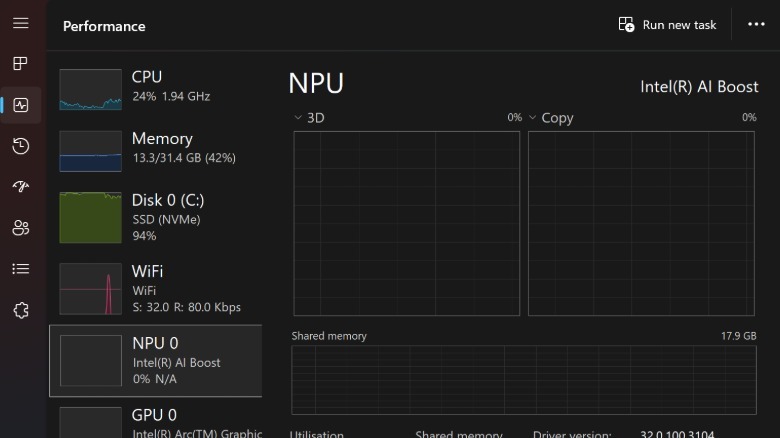
Alas, the list of apps that lean on the NPU remains short: Windows Studio Effects, Live Captions, Recall and Click to Do, Teams and Zoom noise suppression and a handful of Adobe Creative Cloud features.
An NPU in action
To see how much of my 34 TOPS Intel AI Boost NPU a local model would hog, I downloaded Mistral 7B, a fairly decent, efficient open-source model and ran it via Intel's OpenVINO toolkit. I then asked it to generate 2,500 words on neural processing units.
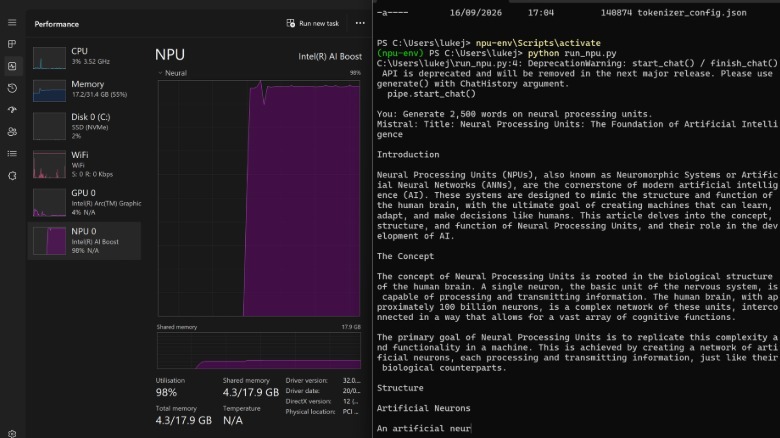
Although my machine has 34 platform TOPS combined across the CPU, GPU and NPU, only 11 are dedicated to the NPU. Mistral 7B pegged the NPU at 98 percent while the CPU sat at three percent. Text generation worked, and while 11 TOPS doesn't leave much headroom for a model of that size, my laptop remained fast and responsive.
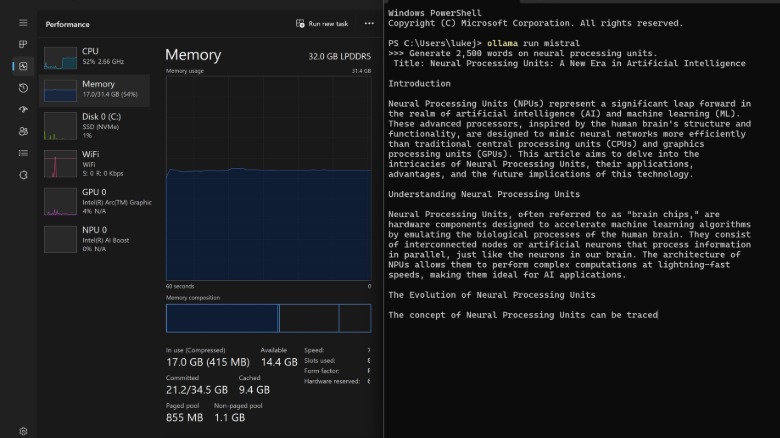
You can see how this compares to running the same local model off the NPU using Ollama. CPU utilization jumped to 52 percent with memory use holding at around 17GB of my 32GB capacity. If I were running other CPU-intensive workloads, my laptop would've ground to a halt. That's the point of an NPU: It handles an AI workload without impacting the rest of the system. But it required a specific toolkit and technical knowledge to get there in this instance; very little software natively supports it.